
Last Tuesday, I watched a solopreneur named Ahsan show his entire business backend — and honestly, I was a bit shocked.
The customer inquiries were being received, and the system was prioritizing the inquiries automatically according to intent and urgency. It was also responding with personalized messages, updating the CRM, initiating follow-up processes, and even booking qualified leads to his calendar.
And the most interesting aspect?
Ahsan was sitting comfortably in a chai cafe the whole time — laptop closed, holding a cup of tea, completely stress-free.
All of this was running on AI workflow automation — and Ahsan built the entire system in just one weekend. No coding. No developer. Just a laptop and a $49/month tool.
This is the unpleasant fact. Some individuals are still pasting data in between spreadsheets at 11 PM, but others have silently automated 80 percent of their routine jobs. The gap between the two groups is growing wider every single month.
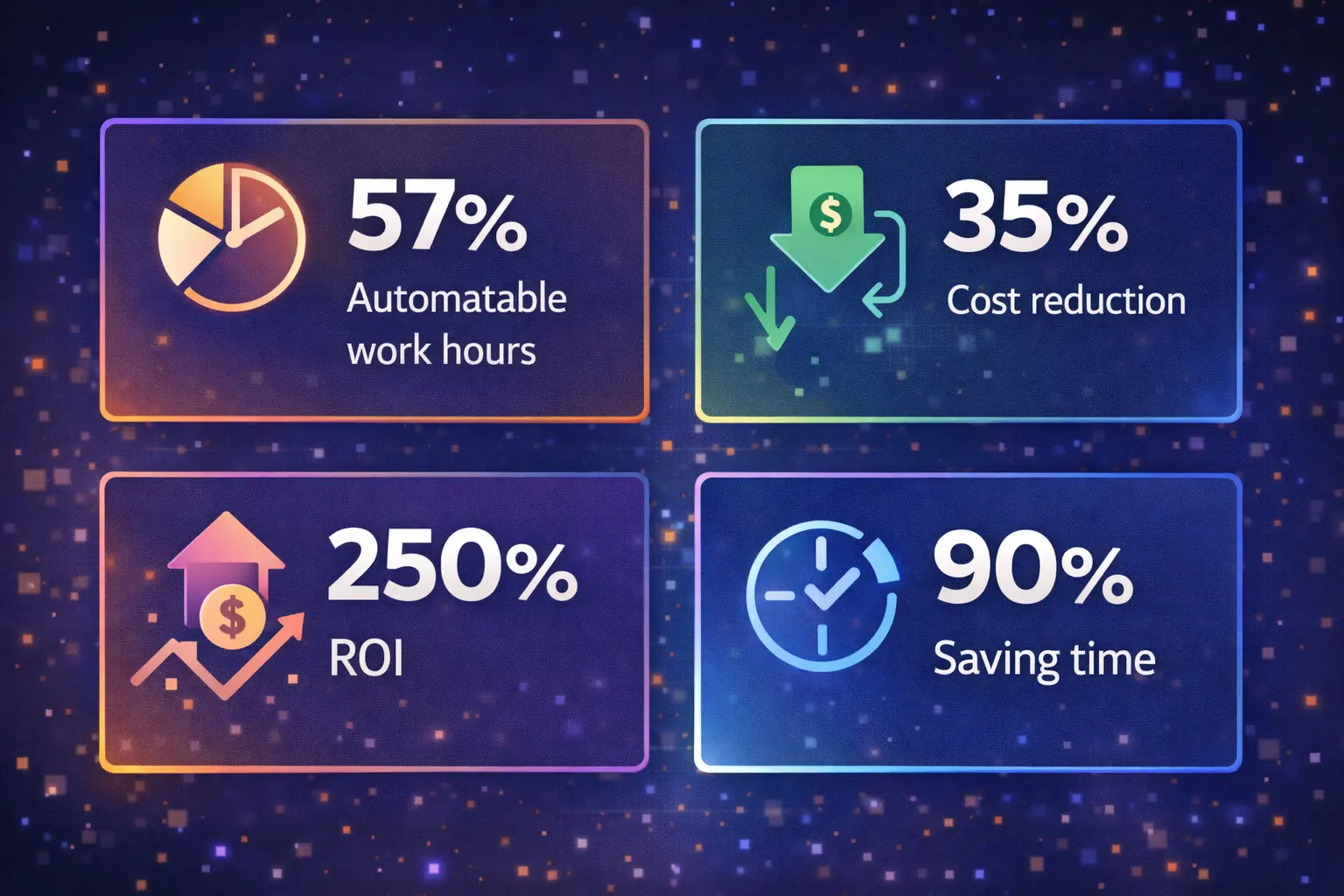
According to McKinsey, 57% of U.S. work hours could be automated with today’s AI technology. Not in some distant future — right now. And yet, most people haven’t even started.
This guide is your starting line. Whether you’re a freelancer drowning in admin, a marketing manager buried in reports, or a business owner who wants to scale without burning everyone out — you’re about to learn exactly how to automate tasks with AI, step by step, with real tools and real examples.
No hype. No jargon. Just the clearest guide you’ll find anywhere.

What Is AI Workflow Automation?
AI workflow automation is a smart way to use artificial intelligence to handle your daily business tasks automatically — tasks that normally take a lot of manual effort. In simple terms, it connects your everyday tools (like Gmail, Slack, Google Sheets, or Notion) with AI, so they don’t just move data — they actually understand, analyze, and make decisions.
Traditional automation works on simple rules:
“If this happens → do this.”
The thing is AI workflow automation can do even more than that.It can read a message, understand it , decide what part of it is most important and take the right action with little human help.
Consider it in the following way:
Simple automation is similar to a conveyor belt – it simply transfers things between locations.
AI workflow automation is similar to a smart employee on a conveyor belt. It is able to read, make decisions, correct errors and even learn with time.
For example:
Regular automation might send an email when someone fills out a form.
But AI workflow automation will:
- Read the form
- understand what the person wants
- Check how urgent it is
- write a personalized reply
- Assign it to the right team member
- Update your CRM
- And save a note for future tracking
And all this is automatic – before you even get through with your morning coffee.
These workflows can be constructed using simple tools that have drag-and-drop interfaces. No coding needed. You simply hook up your apps and instruct the AI to do as you please in plain English.
It is possible to set up a workflow that monitors your brand being mentioned on social media. AI reads every reference, knows when it is a positive or a negative reference, and automatically generates tasks in your system, such as responding to a customer or correcting a problem.
This is why AI workflow automation is so powerful.
It doesn’t just save time — it does the thinking part of the work too.
Why AI Workflow Automation Matters in 2026 (The Numbers Don’t Lie)
I want to base this discussion on reality for a minute, as the figures surrounding AI automation are no longer impressive but difficult to disregard.
The global AI automation market has already crossed $129.95 billion in 2025, and it’s growing at a massive 31.4% annually. That means we’re looking at a $1.14 trillion market by 2033. Even more telling? The automation of workflow itself is projected to reach almost $28 billion in 2026. This is no future speculation, but it is occurring now.
But to be truthful, those large figures only have significance when related to your everyday job. And that is what is interesting.
Currently, 68% of employees indicate that they are struggling with the amount and speed of work. Nearly fifty percent are burnt out. It is not a productivity problem; that is a system problem. The workload has increased, and the manner in which we work has not changed as rapidly.
Now compare that with people already using AI tools:
- 90% say they save time
- 85% say they can focus on more meaningful work
- 83% say they actually enjoy their work more
That last one surprises most people. It is not only about efficiency, but it is also about eliminating the type of repetitive, exhausting jobs that make work frustrating to begin with.
And on business grounds, the effect is even more obvious.
Firms that automate with AI are experiencing:
- Around 35% reduction in operational costs
- An average ROI of 250% within 18 months
- Up to 340% ROI in customer service automation within just 6 months
That’s not incremental improvement—that’s a complete shift in how businesses operate.
What’s even more important is who’s adopting this fastest. Big businesses are not the only ones. The small and medium businesses are also rapidly following and the adoption is rising to 22% to 38% by 2024 and 2026 respectively. Businesses that moved early are not always the largest ones, they are simply those that realized that automation is important and took action on it.
5 Types of AI Workflow Automation (Know Which One You Need)
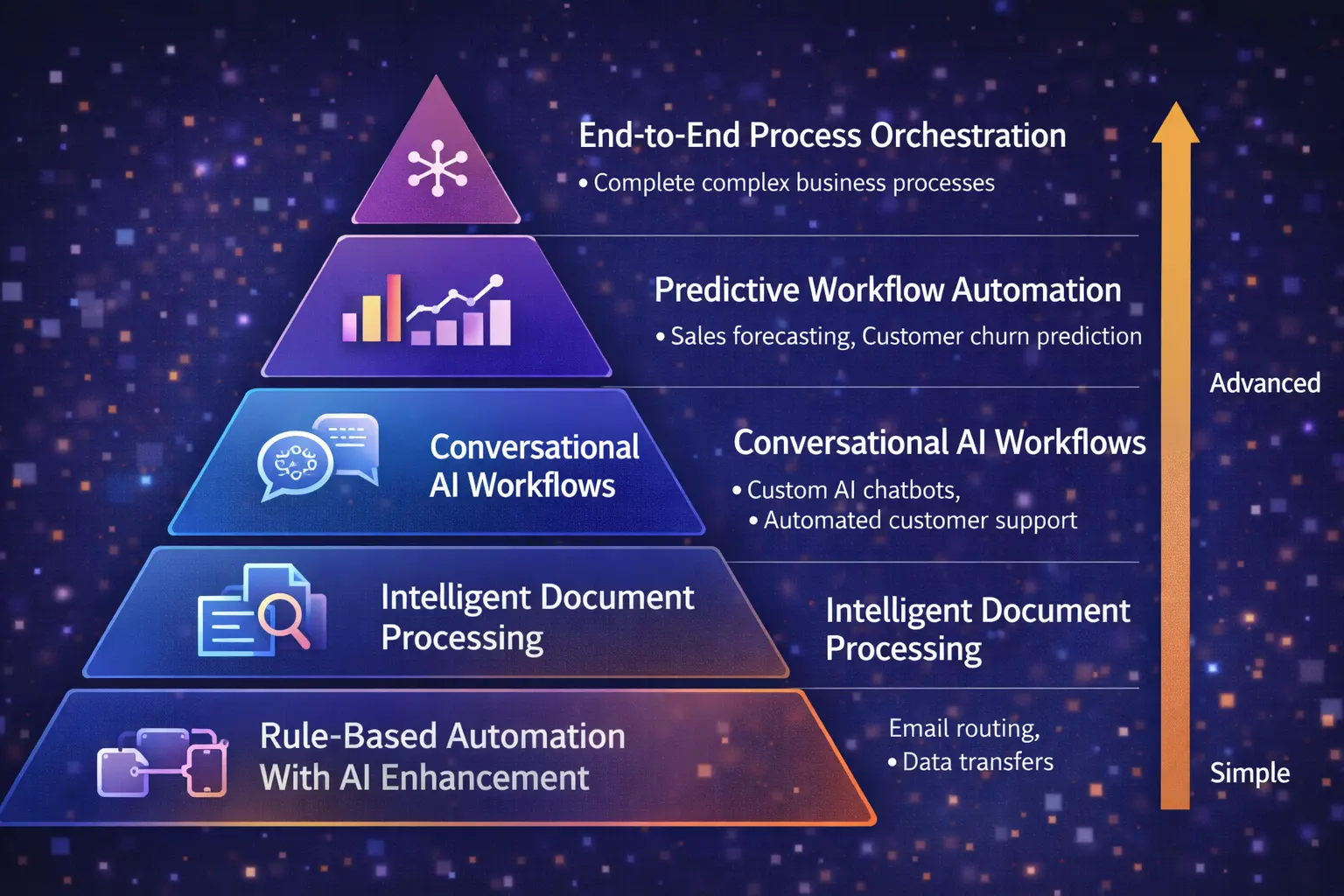
One mistake a lot of people make is thinking “automation” is just one thing. It’s not. There are different levels and types—and knowing where you fit helps you avoid overcomplicating things early on.
1. Rule-Based Automation (Enhanced with AI)
This is where most people should start.
Traditional automation works on simple “if this, then that” logic. However, when you introduce AI to the equation, it is a lot smarter. AI is able to analyze context, in contrast to considering all inputs as equal.
As an example, AI can: send all support emails to a single inbox instead of one.
- Read the message
- Detect urgency and sentiment
- Route it to the right person instantly
It’s simple to implement, but the impact is immediate. Perfect for beginners.
2. Intelligent Document Processing
If your business deals with invoices, receipts, contracts, or forms—this is a game changer.
Instead of manually entering data, AI can:
- Read different document formats
- Extract relevant information
- Understand context (not just text)
- Improve over time with corrections
Teams that employ it are saving hours per week- in particular accounting, operations and workflows that are heavy on administration. It is among the quickest methods of getting rid of repetitive labor.
3. Conversational AI Workflows
This is where automation starts to feel more “human.”
Modern AI chat systems don’t just respond—they actually handle tasks. They can:
- Manage full conversations (not a single reply)
- Real-time pull data of your systems.
- Book appointments, process requests, or escalate issues
And not as stiff and programmed as older chatbots. They are responsive to the discussion and hence much more applicable in the real world such as customer relations or lead management.
4. Predictive Workflow Automation
This is where things shift from reactive to proactive.
Instead of waiting for something to happen, AI predicts what’s likely to happen next. For example:
- Which are the most likely leads to be converted?
- When inventory might run low
- What do we have in terms of projects that may be delayed or have overruns of budget?
Then it triggers workflows before problems occur.
Companies that apply predictive automation tend to minimize delays and bottlenecks since they do not always have to catch up.
5. End-to-End Process Orchestration
This is the most developed level- and where everything begins to be almost independent.
In this case, AI does not only deal with tasks but it deals with complete processes, end to end. Think:
- Employee onboarding
- Loan processing
- Full marketing campaigns
It links various tools, decides at every stage, and engages human beings only when needed.
Companies that are testing such systems are already enjoying up to 65 % Reduction of routine approvals. It implies fewer interruptions, increased speed of execution, and high-value work.
How AI Workflow Automation Works Under the Hood
Strip away the buzzwords and four components power every AI-automated workflow:
Triggers kick things off. A new email arrives. A form gets submitted. A sale closes. A calendar date is reached.
AI Processing is where the magic lives. The AI analyzes input — reading text, classifying data, extracting information, making decisions based on patterns. This is the layer that separates intelligent automation from basic if-then scripts.
Actions are what the system does based on the AI’s analysis. Send a message. Update a database. Generate a report. Create a task. Post to social media. The action library is massive and growing.
Feedback Loops close the circle. The system monitors outcomes — did the customer respond? Was the classification correct? — and uses that data to improve over time.
Think of it like a very sharp new employee. Day one, they follow instructions. Month three, they’re anticipating your needs. Month six, they’re handling things you didn’t even know to delegate.
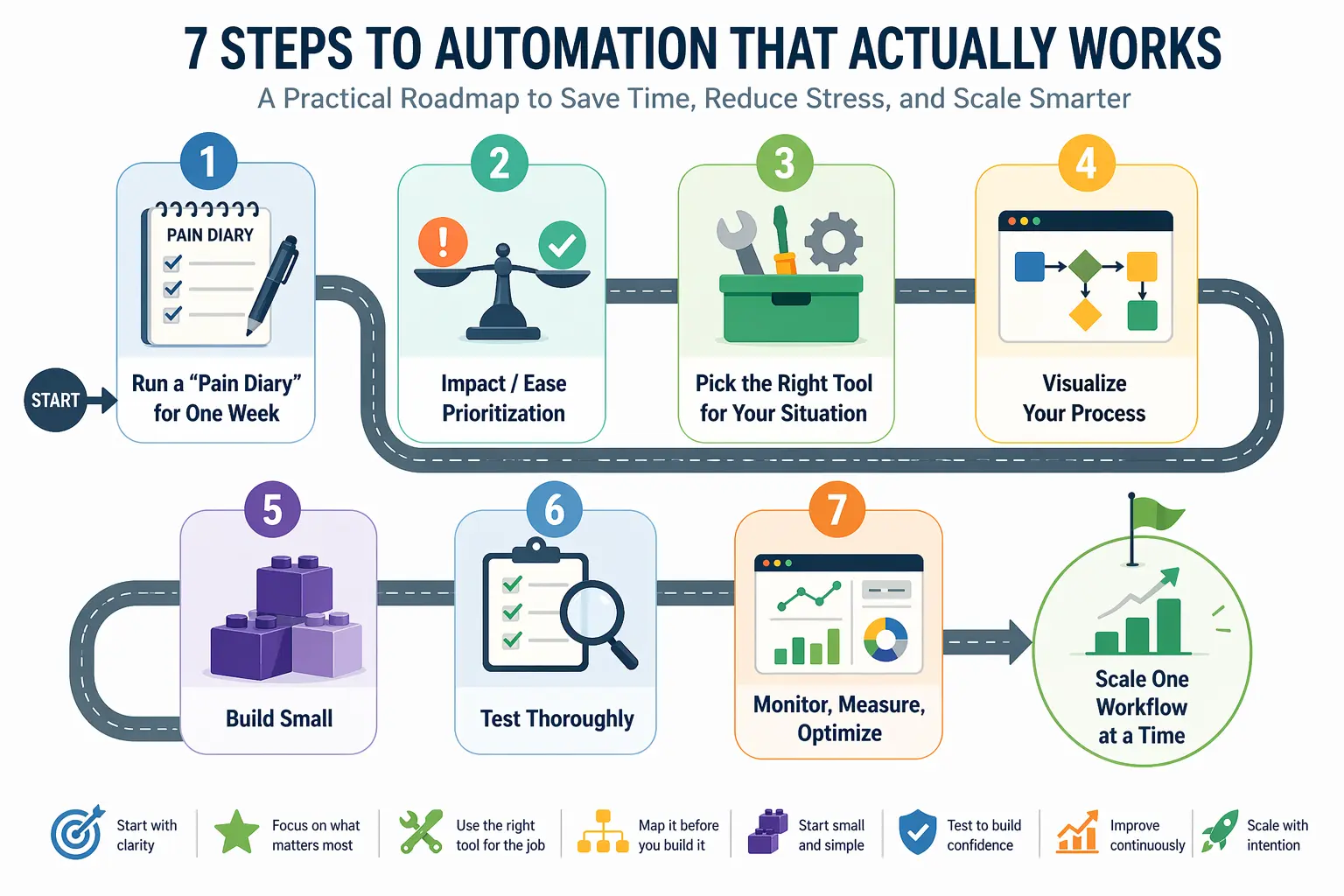
How to Automate Tasks With AI: A 7-Step Action Plan
You do not need technical expertise or large installation in case you want to begin with AI workflow automation. All you need is a well-planned strategy and a couple of hours to create your first workflow. This action plan will be step-by-step in assisting you to automate tasks in a very simple and practical manner.
Step 1: Run a “Pain Diary” for One Week
Begin by tracking your daily activities one week. Note down any aspect that seems repetitive, tedious or time consuming such as email, data entry or time table. This will make you have a clear picture of how you are spending your time.
Majority of the population spends a large proportion of the week at repetitive work. These activities are the simplest and most useful to automate using AI.
Step 2: Impact / Ease Prioritization
After you have your list in mind, work on the tasks that are the most time saving and simple to automate. You should not attempt to automate everything immediately, in most cases, it causes confusion.
Begin with easy high impact activities. These easy gains provide rapid outcomes and allow you to gain confidence in AI workflow automation.
Step 3: Pick the Right Tool for Your Situation
Various tools are created to address various requirements. A freelancer might require a basic tool whereas a business might require a more high-tech tool. The trick is to select a tool that fits your existing process.
Avoid overcomplicating things in the beginning. Your work ought to be easier when using the right tool, not more difficult.
Step 4: Visualize Your Process
Plan how to do your work before you start building something. Consider a straightforward sequence of thought trigger, decision, action, and result. This will make your automation more organized and efficient.
What happens when something goes wrong is also considered. It saves time in the future as a proper plan prevents you from making errors.
Step 5: Build Small, Test Thoroughly
Automate just a single workflow to start with, rather than automating everything immediately. This makes it easier to manage and fix issues. Test your automation using real data.
Check for errors, edge cases, and unexpected behavior. Adequate testing makes sure that your workflow functions in practice.
Step 6: Monitor, Measure, Optimize
As soon as your workflow is running, monitor its performance. Quantify time saved, errors minimized, and efficiency. This will give you an idea of the actual effect of automation.
Periodically review your workflow and improve. AI automation is most effective when you continue to optimize it.
Step 7: Scale One Workflow at a Time
Once your initial workflow has been developed successfully, begin to expand. Implement new automations gradually rather than all at the same time. This will maintain the stability of your system and make it easy to operate.
With time, these workflows interrelate and will constitute a strong system that will save hours per week and enhance productivity.
Best AI Workflow Automation Tools Compared (2026)
The tool landscape has matured dramatically. Here’s an honest, head-to-head comparison based on the latest 2026 pricing and features.
| Tool | Best For | Integrations | AI Capabilities | Ease of Use | Starting Price | Standout Feature |
| Zapier | Non-technical teams needing speed | 7,000+ | AI Actions, natural language workflow builder | ★★★★★ Easiest | Free / $20/mo | Largest app library, 15-min setup |
| Make | Power users wanting visual control | 1,500+ | AI modules, prompt engineering interface | ★★★★ Moderate | Free / $9/mo | 60% cheaper than Zapier at scale |
| n8n | Developers wanting full control + AI agents | 400+ | Native LangChain, AI agent loops, RAG pipelines | ★★★ Technical | $0 (self-hosted) / $20/mo cloud | Open-source, unlimited self-hosted executions |
| Microsoft Power Automate | Microsoft ecosystem businesses | 1,000+ | Copilot AI, AI Builder | ★★★★ Moderate | Included in many M365 plans | Deep Office 365 + Dynamics integration |
| Bardeen | Individual productivity | 100+ | AI web scraping, smart suggestions | ★★★★★ Very Easy | Free / $10/mo | Browser-based, zero setup |
| Relevance AI | AI agent-based workflows | 50+ | Custom AI agent builder, tool chains | ★★★ Moderate | Free tier available | Agent-first design |
| Lindy.ai | Personal + team AI assistants | 100+ | Autonomous multi-agent collaboration | ★★★★ Easy | Free trial / Paid plans | Agents that collaborate together |
Quick Decision Guide: : What AI Workflow Automation Tool to use?
Choose Zapier in case your organizational team is not technical and you desire to begin with the simplest method of AI workflow automation. It has upwards of 7,000+ app integrations, and the majority of users are able to create their first automation within less than 15 minutes. The pricing begins with free, and paid plans cost about $20/month, but may become expensive fast as the usage increases.
Pick Make (Integromat) when you have more complex workflows with logic, loops, and data processing. It is more appropriate to expanding businesses that do not require a lot of costs but flexibility. An average plan will cost approximately $9/month with 10,000 operations, which is much less than $49/month with Zapier with 2,000 tasks.
Choose n8n in case you require complete control over your data, or want to create advanced AI workflows with agents. It works best with developers or businesses that have privacy needs, such as GDPR or finance compliance. The self-hosted version can be as cheap as $10 – 15/month in server costs, and the unlimited executions, thus it is highly cost-effective at scale.
Select Pick Power Automate in case your firm is already using Microsoft 365 applications such as Outlook, Teams, or SharePoint. It becomes a part of the Microsoft world and is frequently part of already existing strategies. This renders it an economical option among companies that are already operating within that setup.
Real-World Examples: AI Workflow Automation in Action
I will try to explain with some real-world examples how AI workflow automation saves time. This includes small businesses, departments, freelancers, and agencies etc.
The E-commerce Store Owner
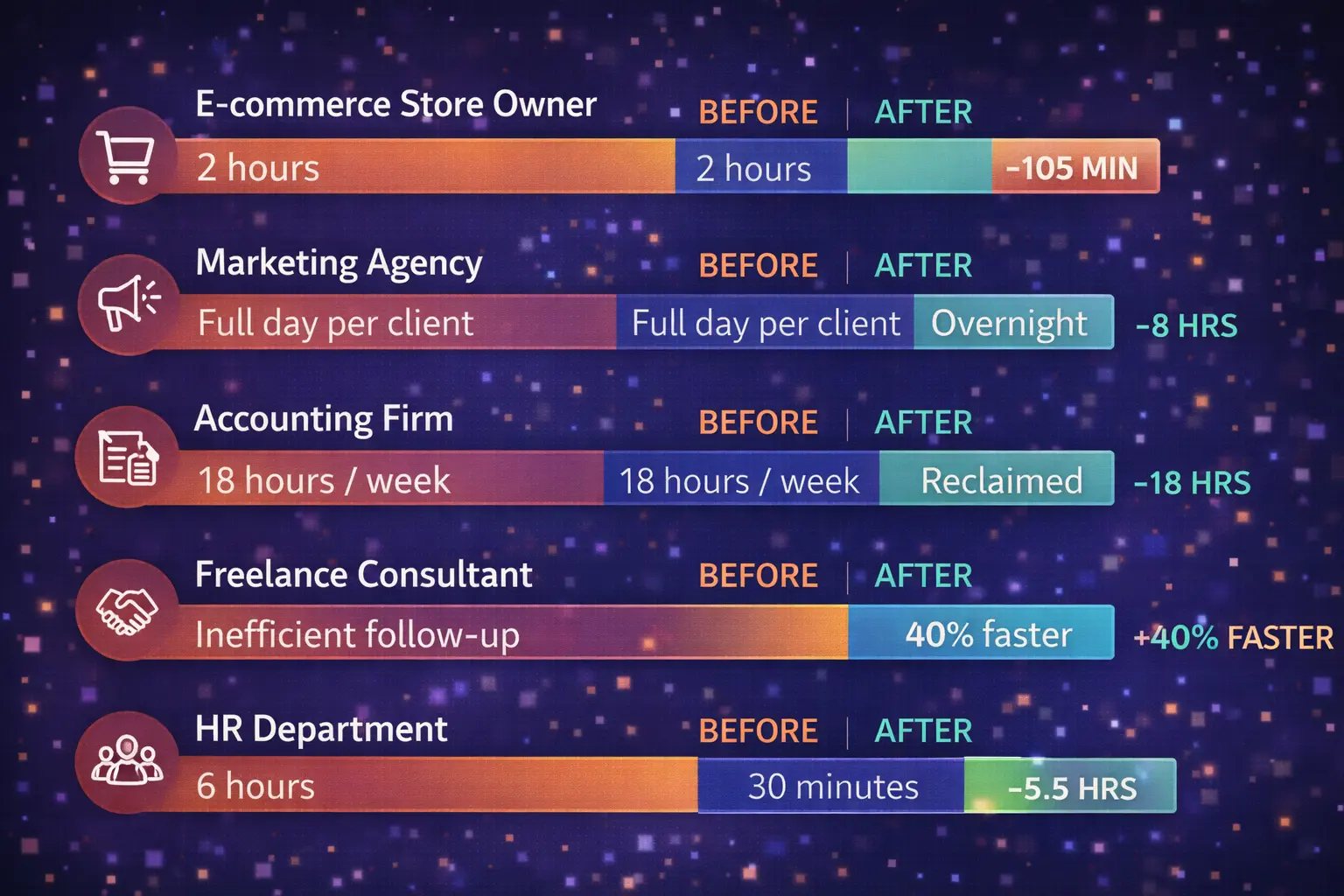
Sarah is sell handmade candles on Shopify. She could take two hours in the morning making orders, updating stock, and providing confirmations. Orders are now automatically taken, shipping labels are created, and inventory levels are updated, personalized confirmation messages are sent (with AI-written product care tips based on what the customer ordered), and red flags are raised when anomalies are detected to be reviewed by hand. Morning routine: between 2 hours to 15 minutes.
The Marketing Agency
Client reporting was automated by a 12-person agency. Each Monday, AI retrieves information in Google Analytics, on ad platforms, and social dashboards, produces a narrative summary of the wins and concerns, documents the information in a formatted PDF, and sends it to the clients with a customized note. What took a junior analyst a full day per client now happens for all 30 clients overnight.
The Accounting Firm
An accounting firm of middle size used smart document processing to handle invoices. AI reads data on invoices of any type, compares it to purchase orders, identifies discrepancies, and forwards approved invoices to the payment processor. They reclaimed 18 hours per week — and errors dropped by 73%.
The Freelance Consultant
Marcus automated his client intake. Once a prospect completes his contact form, AI analyzes the scope of the project, sends follow-up emails with appropriate portfolio samples (as chosen by AI based on the industry of the prospect), sets up a discovery call, and develops a draft proposal. Conversion rate of inquiry to client was enhanced by 40%.
The HR Department
Onboarding a new employee to his/her HRIS, AI will create an account on 12 platforms, provide a unique onboarding schedule, a welcome email with training resources related to their role, a team buddy, and arrange a check-in meeting in the first, second, and fourth weeks. The onboarding minute age was reduced to 30 minutes per new employee.
7 Mistakes That Kill Your AI Workflow Automation (Avoid These)
I’ve seen these patterns tank automation projects over and over. Every one is preventable.
- Automating a broken process. When your existing workflow is ineffective, automation merely renders it efficiently bad. Automate it after it is fixed. It is true to a fault: rubbish in, rubbish out – only at a greater speed.
- Trying to automate everything at once. 85% of organizations say combining multiple automated tasks makes end-to-end process management more complex (Camunda). Start with one workflow. Prove it works. Then expand.
- Ignoring the people involved. 53% of workers who use AI worry it makes them look replaceable (Microsoft). Involve your team in the design. Frame automation as “less boring work, more interesting projects” — because that’s exactly what it is.
- Skipping the testing phase. 82% of organizations say miscommunication between teams leads to the wrong automation being built (Camunda). Test with real data. Test edge cases. Test what happens when inputs are messy.
- Setting and forgetting. APIs change. Business requirements evolve. What worked six months ago might be silently breaking. Schedule quarterly automation audits. Set error alerts. Review execution logs.
- Over-relying on AI for high-stakes decisions. AI handles routine decisions brilliantly. But for large financial transactions, sensitive customer issues, or legal compliance — keep a human in the loop. Always.
- Not documenting your workflows.Not documenting your workflows. Three-quarters of companies believe that automation is unable to match the pace of organizational transformation (Camunda). Record the workflow what each workflow is, its purpose, dependencies, and ownership. You will be thankful in the future.
Pro Tips From the Automation Trenches
Think in workflows, not tasks. Don’t just automate sending an email. Automate the entire chain: trigger → research → draft → send → follow-up → track response. Individual task automation saves minutes. Workflow automation saves hours.
Use AI where inputs are messy. Traditional automation handles clean, structured data well. AI shines with unstructured inputs — natural language emails, varying document formats, ambiguous data. That’s where the ROI multiplier kicks in.
Build graceful failure paths. Every automation should have error handling. If AI can’t classify something with high confidence, it should flag for human review — not guess and send the wrong response to a client.
Leverage templates first, customize second. Every major platform offers pre-built templates for common workflows. Start there. Get it running. Then tweak. Don’t build from scratch unless you genuinely have to.
Track your “time recaptured” metric. Time saved is vague. “Time recaptured” is specific: how many hours did your team redirect from routine work to high-value work this month? That’s the number that gets budgets approved and teams excited.
The Future of AI Workflow Automation: 4 Trends to Watch
Trend 1: Agentic AI Replaces Linear Workflows
The biggest shift happening right now. You do not create step-by-step workflows, but rather establish your goals and have AI agents determine the most optimal course. The instruction becomes, Reduce customer support resolution time by 30%. The AI designs, tests, and optimizes the workflows to get there.
Gartner predicts that by 2028, 33% of enterprise software will include agentic capabilities that complete tasks autonomously.
Trend 2: Natural Language Workflow Creation
You are not drag-and-drop builders (easier than code): You say what you want with simple English: Every time I get someone who has been referred to me by LinkedIn, researched their business, sent them a personalized email, and set it in their time zone. Both Zapier, Make and n8n released natural language workflow building capabilities in the year 2025-2026.
Trend 3: Predictive Workflows That Prevent Problems
AI won’t just execute your processes — it’ll predict bottlenecks before they happen and adjust automatically. Your procurement workflow notices vendor response times slowing, a conference reducing available approvers, and three large purchases about to hit simultaneously — and adjusts before anything stalls.
Trend 4: Multi-Agent Collaboration
Various specialized agents collaborate, not one AI working on a workflow: one agent does the research, another writes, another schedules and an orchestrator coordinates. This is already operational at n8n and Lindy.ai, and it will be available on all key platforms.
[Suggested internal links: “What Are AI Agents and How Do They Work?”, “Zapier vs Make vs n8n: Full 2026 Comparison”, “How to Use AI for Small Business Operations”, “AI in Customer Service: The Complete Guide”, “Best No-Code Automation Tools for Beginners”]
Conclusion: The Best Time to Start Was Yesterday. The Second-Best Time Is Now.
At this stage, it can be said that the following is quite obvious: AI workflow automation is not only a trend, but it is a more intelligent approach to work.
Individuals invest hours on routine activities such as emails, data entry, follow-ups, and reporting every day. Such activities are not only time consuming, but also energy consuming and slow down development. It is here that AI workflow automation can really come in. It handles the day to day work so that you can concentrate on what really counts in growing your business, enhancing your skills and making better decisions.
And this is not just theory — real companies are already seeing results. Approximately three-quarters of companies are already applying AI in some aspect of their processes, and some are recording actual savings of costs and increased efficiency.(McKinsey & Company)
The automation of workflows using AI is saving operational costs in some sectors such as healthcare by 30% to 60%, and it demonstrates that the power of workflow automation can be very strong when used properly.(McKinsey & Company)
According to other reports, AI automation by businesses leads to 200% or higher ROI and a 75% to 90%processing time reduction in activities such as data handling and document processing. (Samyotech)
The most important thing is that it is now easier than ever to get started. It does not require any code writing, a large group of people, or costly software. Just a few hours, and you can automate your first task and begin to see real results. And you can scale and create more workflows as time passes once you start.
From freelancers to small businesses to large companies, everybody is going towards automation. Not because it sounds good — but because it saves time, reduces errors, and improves productivity in a very real way. The gap is growing between those who automate and those who don’t.
So the real question is not “Should you use AI workflow automation?”
It’s “How soon will you start?”
Start small. Pick one repetitive task this week and automate it. That single step can save you hours — and a few months from now, you’ll wonder how you ever worked without it.
AI workflow automation can assist you in saving time, eliminating manual work, and enhancing productivity. Already, businesses utilizing AI experience cost savings, accelerated processes, and a high ROI – and you can begin with a single simple workflow.
Frequently Asked Questions About AI Workflow Automation
What is AI workflow automation in simple terms?
AI workflow automation is artificial intelligence that processes series of business tasks automatically. In comparison to simple automation, which operates under strict principles, AI automation reacts to the context, takes decisions, processes unstructured data such as emails and documents, and advances with time with little to no human involvement. Businesses that have used it have an average decrease in operational costs by 35%.
How is AI workflow automation different from regular automation?
The traditional automation relies on the set of rules in the form of if-this-then-that and is able to work only with structured, predictable inputs. AI workflow automation introduces intelligence: it processes natural language, catalogs data, passes judgment, deals with unforeseen variations, and learns based on the results. Consider regular automation as a conveyor belt. AI automation is a human worker who adjusts on that conveyor belt in real time.
Do I need coding skills to automate tasks with AI?
No. Automation platforms such as Zapier and Bardeen have no-code, drag-and-drop interfaces – the majority of users can create their first automation in 15 minutes. Zapier and Make go further to provide natural language workflow creation which involves describing what you want in plain English. As of now, however, more sophisticated tools such as n8n provide more customization to those who feel at ease with code.
How much does AI workflow automation cost?
Costs range widely. There are numerous tools that have a free testing option. Small business plans are usually priced at $9-50/month. To put it into perspective: Make has a plan of 10,000 operations per month at a price of $9/month, whereas Zapier has a similar plan at $49/month and 2,000 tasks. n8n will only cost you a server charge of between 10 and 15/month with unlimited operations. Enterprise solutions are more expensive and usually provide 250% ROI after 18 months.
What tasks should I automate with AI first?
Begin with tasks that are repetitive, take time, are prone to errors, and occur frequently on a daily or weekly basis. Based on 2025 industry benchmarks, customer service responses (340% average ROI), data entry and processing (290% ROI), email marketing sequences (240% ROI), invoice processing (280% ROI), and lead qualification, (210% ROI) are the highest-ROI first automations.
Is AI workflow automation safe and secure?
Verified platforms are encrypted, controlled by access, and compliance certification (SOC 2, GDPR). To achieve the highest level of control, self-hosted solutions such as n8n allow you to store all the data on your own infrastructure, which is essential to those industries with high data residency needs, such as healthcare and finance. Look into the security practices of a platform before connecting sensitive systems.
Will AI workflow automation replace my job?
It remodels, but does not destroy, roles. The 20% of decisions that need judgment, creativity, and relationship building is left to humans, as AI does the routine 80% of decisions. Most leaders (79% of those interviewed by Microsoft) say that their company has to use AI to be competitive (Microsoft) — yet it is not the workers with AI who are the most at risk. It is they who do not want to learn how.