
Do you find yourself in the same routine of exporting CSVs, copying data and manually syncing tools everyday? Not only is it a nuisance, it takes away from your productivity and growth.
This is where workflow automation will come into the picture. It’s like the central nervous system of your business and it moves information between apps without your needing to do anything.
That’s great, but you now have another challenge – selecting the right tool.
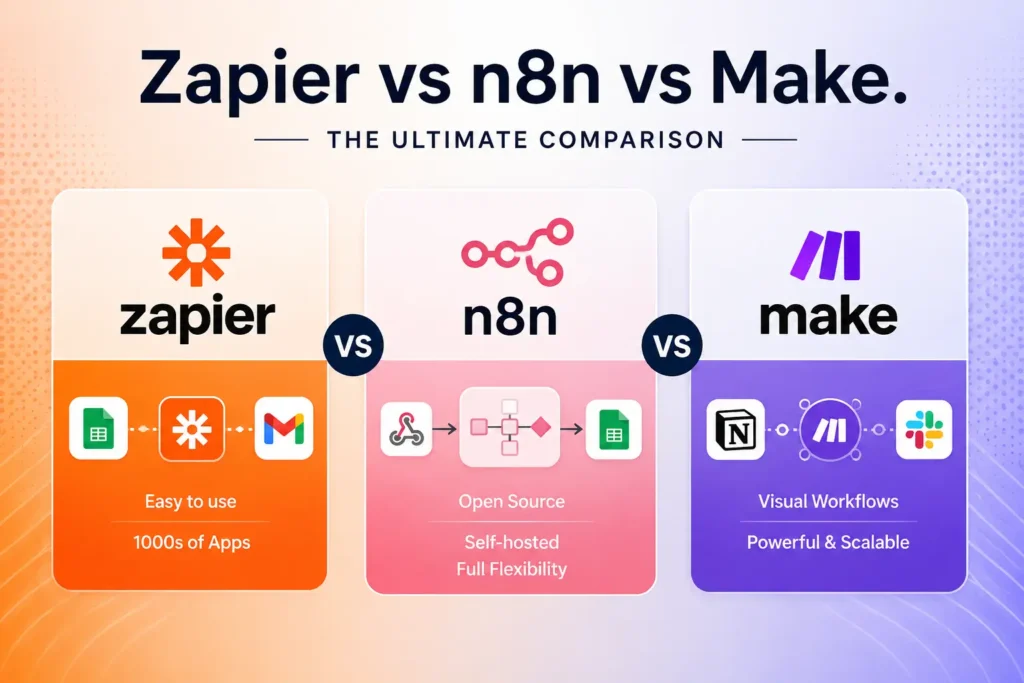
Zapier is best for non-technical teams who want to cover the greatest number of apps and set up quickly. Technical teams can gain the most from n8n, with powerful visual workflows at a fraction of the cost of Zapier, and technical control over self-hosting, and pricing based on execution that remains affordable at any scale. The main difference between these three is your technical acumen, budget and complexity of your workflows. This guide explains all the differences in detail so you can make an informed choice.
Why Workflow Automation Matters More Than Ever
By 2026, companies will be operating dozens – perhaps hundreds – of SaaS applications. Transferring data from one tool to another manually is time-consuming, error prone and not cost-effective. To overcome this challenge, workflow automation platforms join your applications and enable the flow of data between them without writing any new code.
Of these three, Zapier, n8n and Make are the most prominent. They’re competitors, but have very different perspectives on automation. Choosing the wrong one will result in thousands of dollars in excess costs or frustrating technical limitations come when you need to be scaling! The following sections will help you make the right selection.
How Each Platform Works: A Quick Overview
Zapier: Automation for Everyone
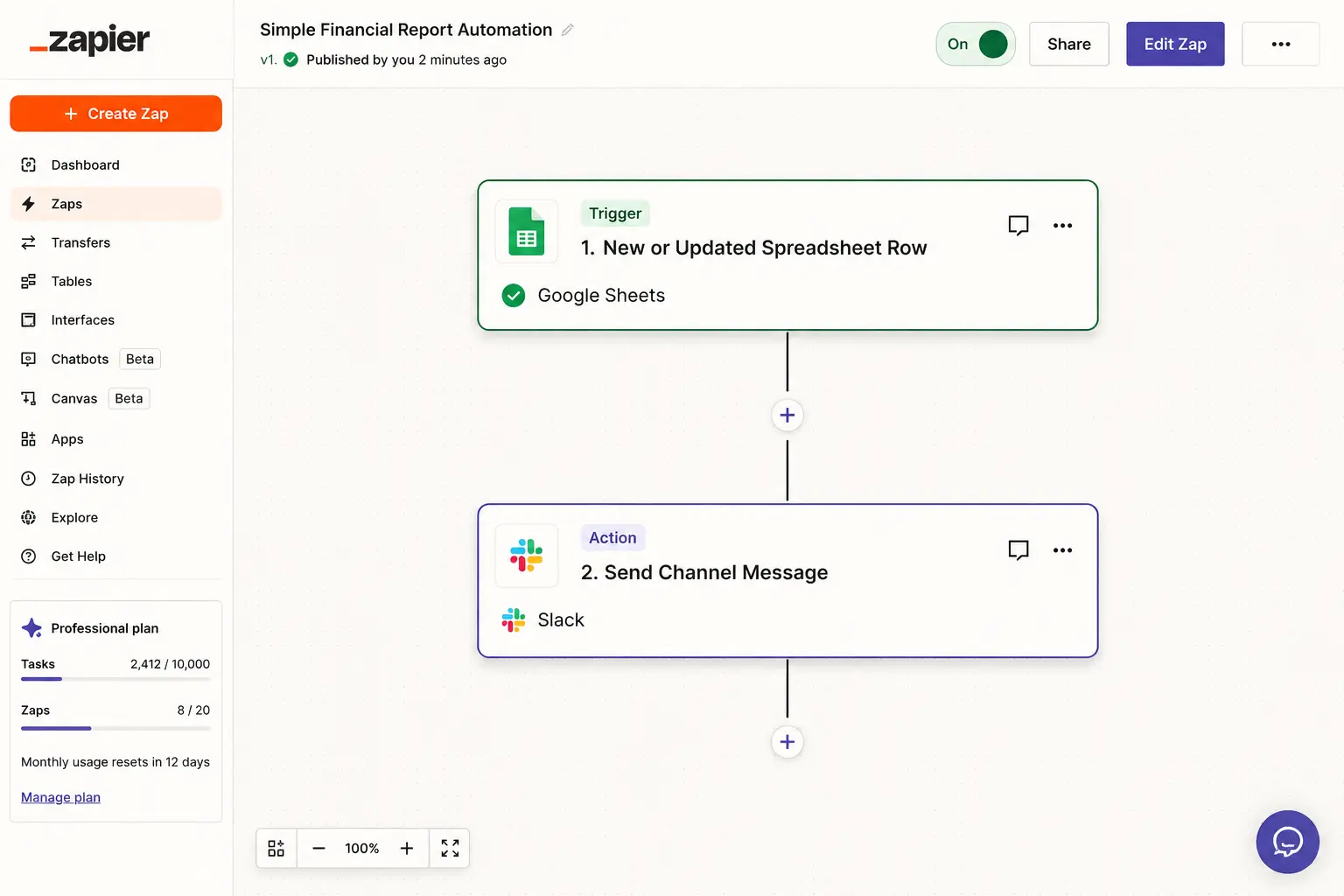
Zapier was founded in 2011 and is the leader in the no-code automation space. It has a step-by-step builder that leads the user through a linear chain of steps known as “Zaps” beginning with a trigger and ending with sequential action steps. Zapier integrates with more apps than any other service, including those that are less popular. There is a price to this, of course: Zapier charges a fee per task, and each action step constitutes a task. If you have a ten-step workflow that runs 1,000 times a month you’re racking up 10,000 tasks a month, and your monthly bill could easily exceed $250.
Make: The Visual Power Player
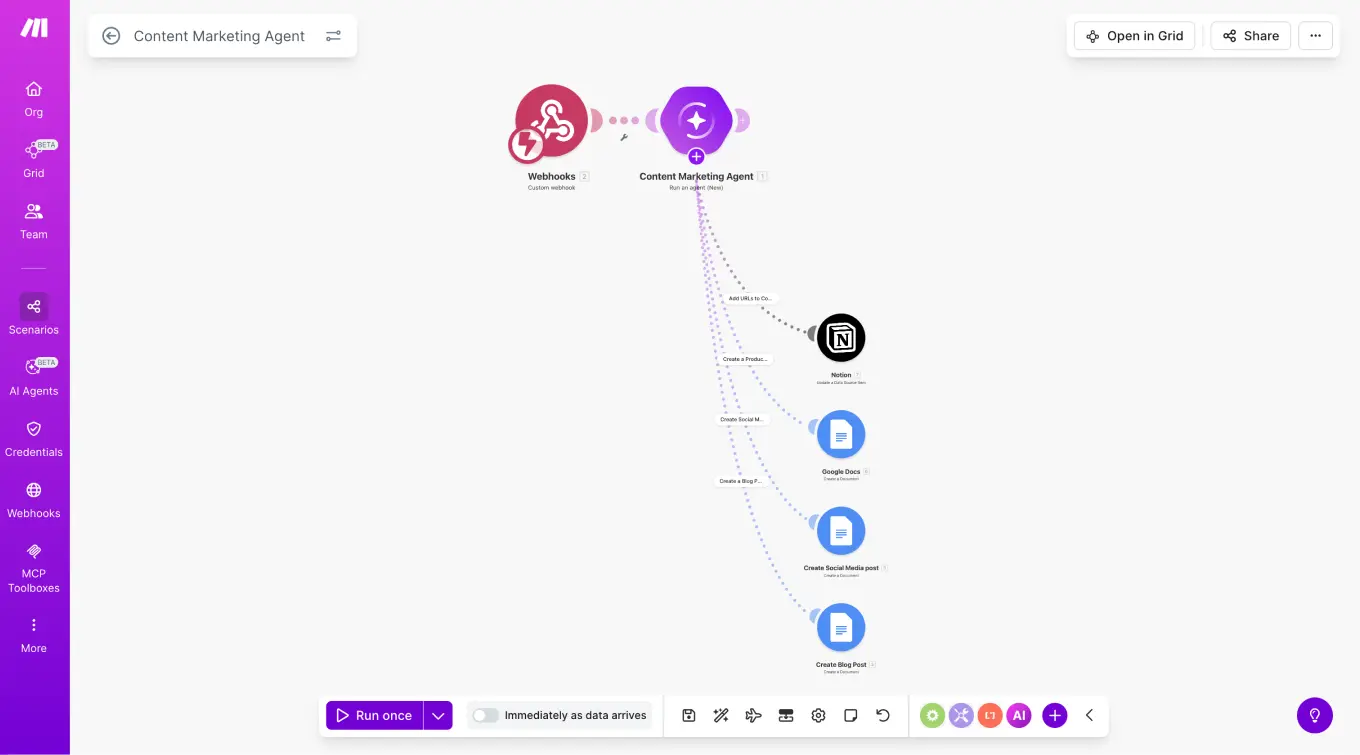
Based in Prague, Make was originally founded as a company called Integromat, and was later acquired by Celonis. It has a canvas-based interface that allows you to drag nodes onto a visual map and draw connections between them, branching and parallel paths, and conditional logic that Zapier’s linear builder can’t do quite as elegantly. Create bills based on operations not tasks—higher paid plans begin at just $9/month for 10,000 operations.
This equates to slightly under 1/3 the cost of Zapier for similar workloads. The free offering also has a lot of room to maneuver: as much as 1,000 operations monthly and 2 lively scenarios, which is plenty to check out worthwhile automations before spending any money.
n8n: The Developer’s Powerhouse
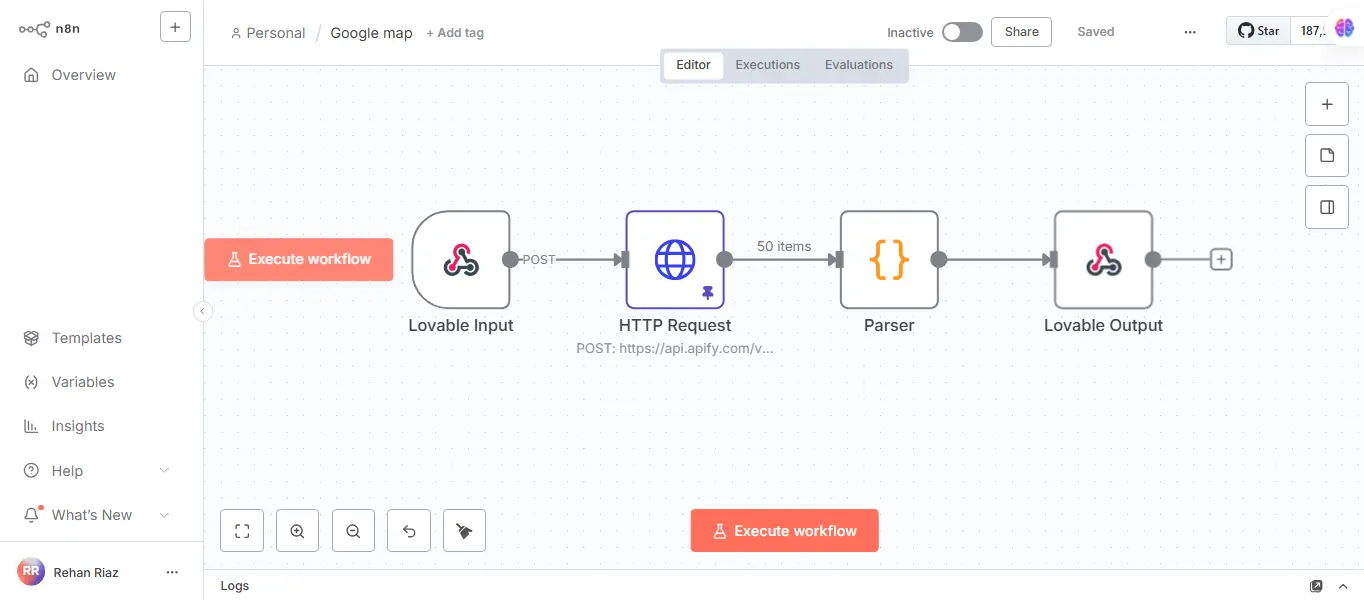
n8n was founded in Berlin in 2019 and has quickly become a $2.5 billion dollar business. It’s all about self-hosting: it’s free to run the entire platform on your own servers with unlimited workflow executions. The cloud version begins at $20 per month. n8n works on execution pricing, where the number of steps in a workflow does not matter, and each run is considered an execution. At scale, that’s a 20x cost difference when compared to Zapier. n8n has 70+ AI nodes, supports integration with LangChain, and offers full support for JavaScript and Python, making it the most advanced solution, but it’s also the trickiest to learn.
Pricing Compared: The Numbers That Actually Matter
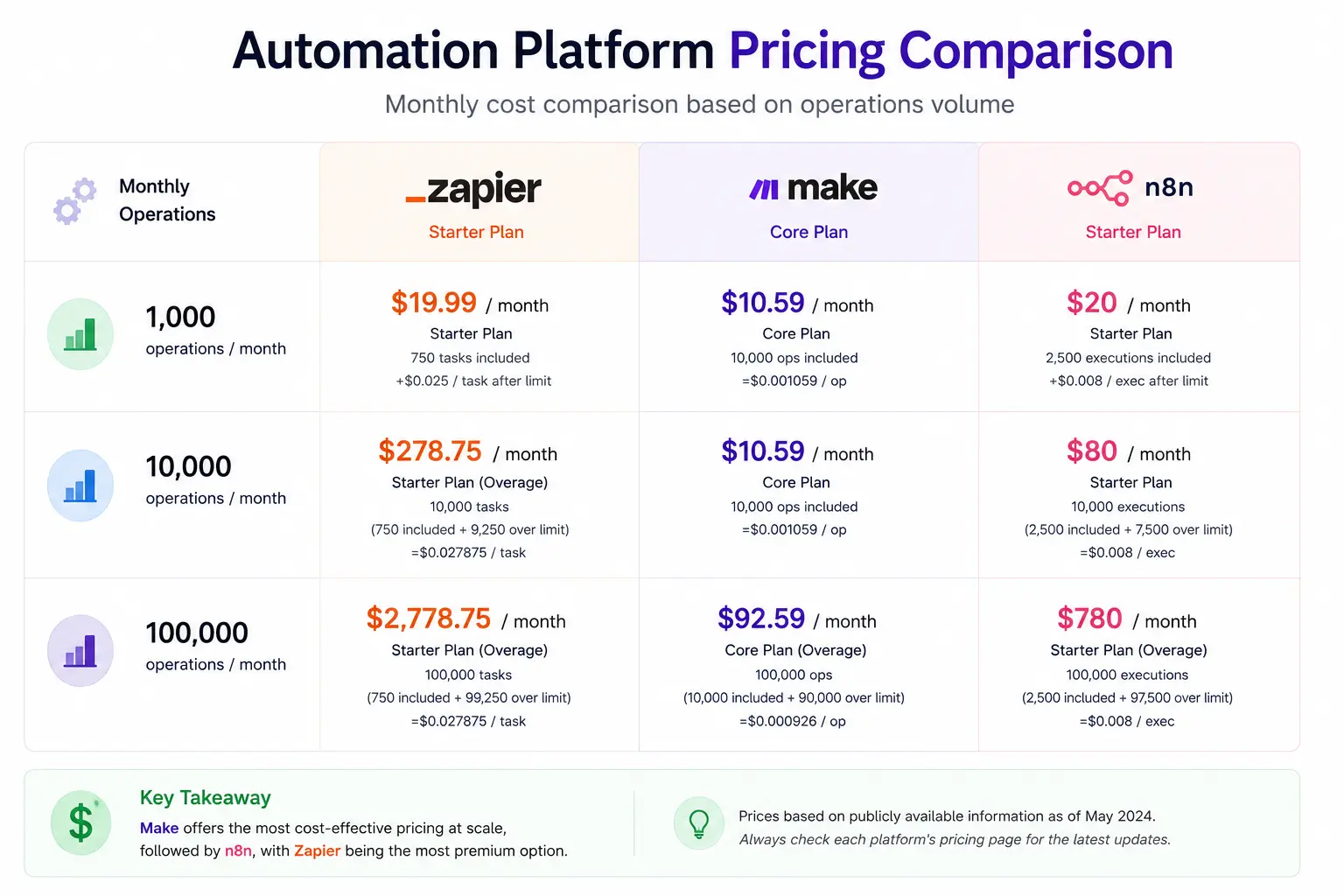
The key in this comparison is cost, as the same workflow can have dramatically different prices across the platforms.
For instance, let’s imagine you have a 10-step workflow that is executed 1,000 times a month. That translates to 10,000 tasks on Zapier, which comes with a price of about $250 to $400 a month depending on the plan. The same workload yields 10,000 operations on Make, at approximately $9 to $29 per month. It uses 1,000 executions on n8n and would cost only $20 per month for the Starter plan, which limits n8n executions to 2,500. Self-hosting n8n will cost even less, a basic cloud server is $5 to $15 per month with no limits on usage whatsoever.
Zapier does have a free account, but it only handles 100 tasks and five 2-step Zap per month, so it’s just enough to run experiments. Make’s free plan offers ten times the capacity, while n8n’s Community Edition is a full-featured, perpetual free offering.
Integrations: Does App Coverage Really Matter?
Zapier is the leader with a massive 8,000+ integrations, which is truly impressive if you are using any of the less popular or specialist applications. Make offers approximately 2,400 integrations, and it has been closing the gap because of its community-driven connector program since 2024. Make really excels at integration depth; the modules have a deeper API than Zapier does for many of the tools they integrate with and they provide you with more control over what you’re able to do in each connected tool.
There are about 400+ 600+ community contributed core nodes in n8n. The raw number is lower, but any platform, including n8n, has HTTP and webhook nodes to connect to any service with a public API. Integration, in practice, only becomes an issue as to speed of implementation, as all three platforms can end up in the same places.
Learning Curve and User Experience
When it comes to accessibility Zapier has got the cake. Thanks to the step-by-step interface and the massive library of pre-built automation templates, the majority of users will be building their first automation and have it up and running in mere minutes. Its AI assistant Zapier Copilot enables you to outline a workflow in natural language and copies it for you.
Learning investment is moderate for Make. The visual canvas becomes easy to understand once you master it, but a few days later, you need to get the concepts of routers, iterators, and aggregators under your belt. The benefits are workflows that have conditional branching and parallel processes, which you would not be able to do in Zapier’s linear system.
The development team behind n8n is made up of data programmers and developers who are familiar with data structures and APIs. When developing workflows, one often needs to examine the JSON payloads, and when self-hosting you have to keep your own infrastructure. Learning can last a few weeks, but its flexibility can be unmatched if you have developer resources.
AI Capabilities: The New Differentiator
AI is revolutionizing the capabilities of automation tools, and the three are using very different approaches.
What n8n has done is take it a step further and has included more than 70 AI specific nodes, including support for deep LangChain integration. You can create retrieval-augmented generation (RAG) systems, deploy autonomous AI agents, and even host LLM on your premises with sensitive information remaining in your infrastructure with n8n! If you have some special privacy requirements and are building AI workflows, then the only one of these three is n8n.
Zapier’s built-in AI tools, like text summarization, sentiment analysis, and content generation, are easy to use and integrate into your business without requiring API keys or the need to tweak model parameters. It includes AI Agents support and the upcoming Model Context Protocol (MCP) support further reduce the entry barrier.
In the middle are Make. It provides direct connections to OpenAI, Google Cloud Vision, Eleven Labs and other AI services, all graphically displayed on the canvas. It is easy to create AI powered workflows with branching logic, but it does not support n8n’s self-hosted models, or complex agent architectures.
Data Privacy and Self-Hosting
Only n8n provides true self-hosting, which is important for organizations in regulated sectors like healthcare, finance, or government. It can be deployed on your own servers or your own cloud account, so that the data never comes into contact with a third party. It has Enterprise Level SOC 2 compliance and ISO 27001 certification.
Make, as a European company, stores data in EU data centers and allows you to choose between US and EU regions, which satisfies many GDPR requirements. Zapier processes data on American servers. Make and Zapier both have SOC 2 Type II certifications, and both are compliant with GDPR, but neither provides you with absolute control like self-hosting does.
ChatGPT Business Plans: A Quick Comparison
| Feature | Zapier | Make | n8n |
| Best For | Non-technical teams | Semi-technical users | Developers & technical teams |
| Pricing Model | ⭐⭐⭐⭐⭐(Very Easy) | ⭐⭐⭐⭐ (Moderate) | ⭐⭐ (Steep Learning Curve) |
| Pricing Model | Per task | Per operation | Per execution |
| Starting Price | ~$19.99/month | ~$9/month | Free (self-hosted) / $20 cloud |
| Cost at Scale (100k runs) | Very expensive | Affordable ($90–$180) | Cheapest ($5–$50) |
| Free Plan | Limited (100 tasks) | Generous (1,000 ops) | Unlimited (self-hosted) |
| Integrations | 8,000+ apps | 2,400+ apps | 400+ core + community |
| Workflow Type | Linear (step-by-step) | Visual (drag & drop) | Node-based (flexible) |
| Advanced Logic | Limited | Strong (routers, filters) | Very powerful (code + logic) |
| AI Capabilities | Easy built-in AI tools | AI integrations (OpenAI, etc.) | 70+ AI nodes + LangChain |
| Custom Code Support | Limited | Moderate | Full (JavaScript, Python) |
| Self-Hosting | No | No | Yes (major advantage) |
| Data Privacy Control | Low | Medium (EU/US servers) | High (full control) |
| Scalability | Expensive scaling | Good scaling | Excellent scaling |
| Setup Speed | Fastest | Fast | Slower |
| Setup Speed | NO | Yes | Yes (especially at scale) |
Step-by-Step Guide: How to Choose the Right Platform
Selecting the right tool requires honest assessment rather than feature-list comparison. Follow these five steps to arrive at a clear answer.
Step 1 — Inventory your apps. List every tool you need to connect. Check each platform’s integration directory. If you rely on niche software, Zapier’s 8,000+ catalog may be the deciding factor.
Step 2 — Estimate your volume. Calculate how many actions your workflows will perform each month. Multiply the number of steps in each workflow by how often it runs. This single number will reveal the true cost on each platform.
Step 3 — Assess your team’s technical skills. If none of them in your team are comfortable with APIs or JSON, it would be safer to use Zapier or Make. With the help of developers, n8n’s flexibility will have a positive impact.
Step 4 — Identify compliance requirements. If you handle patient data, financial records, or any information subject to strict residency laws, n8n’s self-hosting is likely the only option that passes audit.
Step 5 — Conduct a test. All three platforms provide free plans. Create one representative workflow for each of their top two, and compare the ease of setup, the speed of execution and the real costs.
Who Should Choose Which Platform?
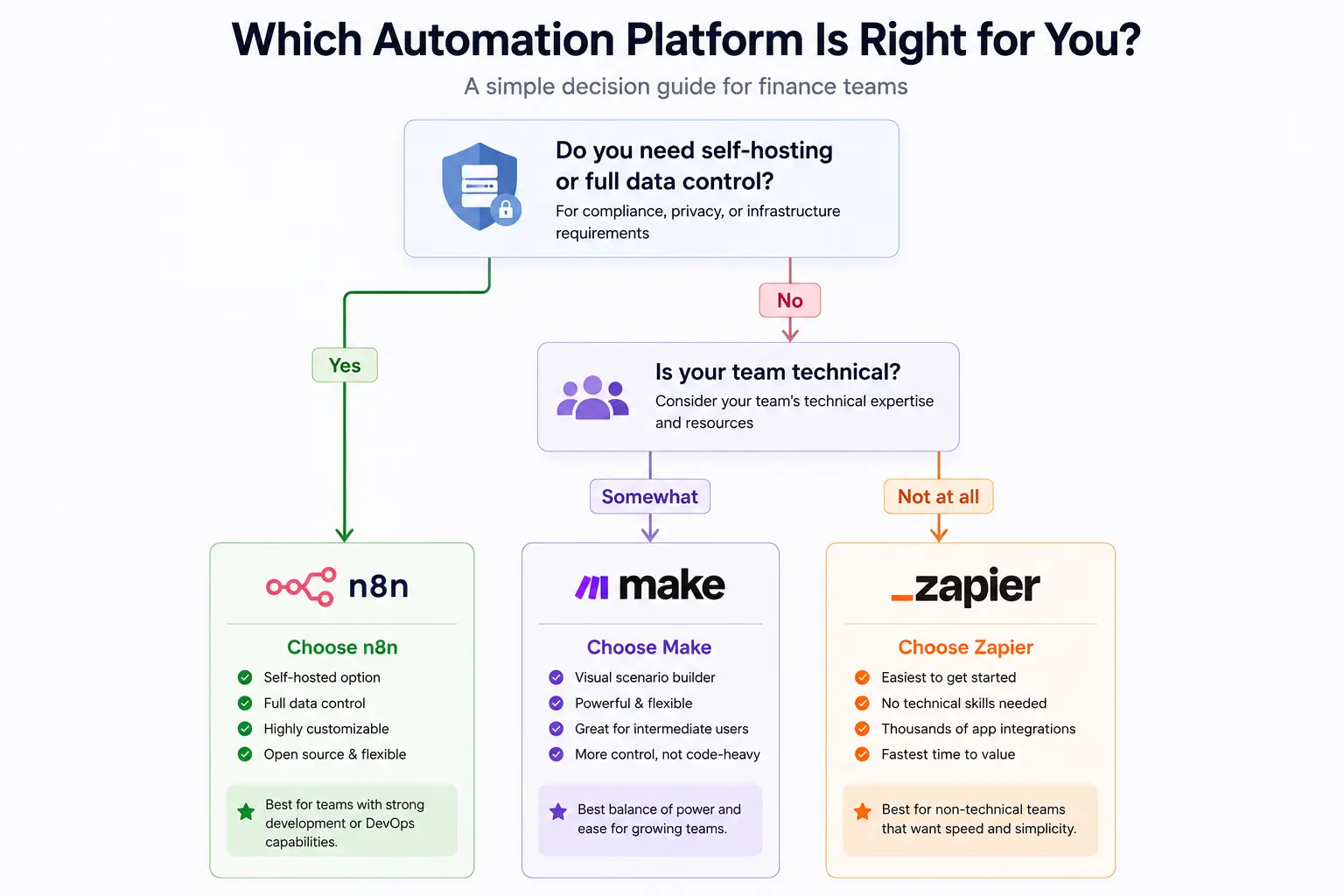
Choose Zapier in case your organizational team is not technical and you desire to begin with the simplest method of AI workflow automation. It has upwards of 7,000+ app integrations, and the majority of users are able to create their first automation within less than 15 minutes. The pricing begins with free, and paid plans cost about $20/month, but may become expensive fast as the usage increases.
Pick Make (Integromat) when you have more complex workflows with logic, loops and data processing. It is more appropriate to expanding businesses that do not require a lot of costs but flexibility. An average plan will cost approximately $9/month with 10,000 operations, which is much less than $49/month with Zapier with 2,000 tasks.
Choose n8n in case you require complete control over your data, or want to create advanced AI workflows with agents. It works best with developers or businesses that have privacy needs such as GDPR or finance compliance. The self-hosted version can be as cheap as $10 – 15/month in server costs, and the unlimited executions, thus it is highly cost-effective at scale.
Many organizations also adopt a hybrid approach, using Zapier for quick, employee-driven automations and deploying Make or n8n for high-volume, mission-critical processes. This combination captures the strengths of multiple platforms without being locked into the weaknesses of any single one.
Conclusion: Which Automation Platform Should You Choose
Choosing between Zapier, n8n and Make ultimately comes down to one thing: how your team works and how your workflows scale.
When you’re looking to get a job done quickly without any technical hassles, Zapier is the simplest solution to connect and automate thousands of apps. Make is the optimal solution for expanding teams who want more options without breaking the bank. But if you’re looking for a long-term solution to manage massive amounts of data, develop AI-powered systems or require comprehensive control over your data, n8n might be the most flexible and budget-friendly option.
In 2026 reality is that automation is not an option. Companies that implement workflow automation say they save 10-20 hours per week per worker and eliminate manual mistakes by a large margin. However, the wrong platform can quietly eat away at your budget – or restrict your growth as complexity grows.
Hence, the best thing to do is not the simple choice of selecting some tool, but of selecting the right one for the right purpose. There are now many successful teams that integrate platforms together: Zapier for fast wins, Make for more complex operations, and n8n for backend and AI-powered workflows.
Prior to making your choice, try it with an actual workflow, estimate the expense, and consider how easy it is to keep up by your staff. It’s the platform that feels simple today, but will be big tomorrow, that will return the greatest investment.
Frequently Asked Questions
Is n8n really free to use?
Yes. The self-hosted Community Edition is completely free with unlimited workflow executions. You only pay for your server, which typically costs $5 to $15 per month. n8n Cloud, the managed version, starts at $20 per month if you prefer not to handle infrastructure yourself.
Which platform has the most integrations in 2026?
Zapier leads with over 8,000 native integrations. Make offers approximately 2,400, and n8n provides around 400 core nodes plus 600 or more community-built nodes. However, all three platforms support HTTP and webhook connections, meaning any service with a public API is reachable regardless of which platform you choose.
Can I migrate my workflows from one platform to another?
You can switch platforms, but there is no automated migration tool. Workflows must be rebuilt manually. The easiest transition is from Zapier to Make because the underlying concepts are similar. Moving to n8n from either platform requires adapting to its node-based architecture. Start by migrating a few non-critical workflows, run both platforms in parallel, and decommission the old one only after thorough testing.
Which platform is best for AI-powered automation?
n8n offers the deepest AI capabilities, including 70+ LangChain-integrated nodes and the ability to self-host large language models for complete data privacy. Make provides solid AI connectors with visual workflow design. Zapier is the easiest for adding simple AI steps like text generation and sentiment analysis without any technical setup.
What does each platform actually cost at 100,000 operations per month?
At this scale the billing model creates enormous differences. n8n self-hosted runs on server costs alone, roughly $5 to $20 per month with no execution limits. n8n Cloud’s Pro plan covers high volume for around $50 per month. Make lands in the $90 to $180 per month range depending on your plan and add-on packs. Zapier, where every step counts as a separate task, reaches $1,200 to $1,500 per month for the same workload.